
Introduction:Why Your Prompts Are Failing (It’s Not Your Fault)
Let’s be honest—most people use ChatGPT wrong. They treat it like Google Search, toss in a question, and hope for a perfect answer. But ChatGPT isn’t a search engine. It’s more like a brilliant intern who needs clear directions to do great work.
If your ChatGPT results sound robotic or vague, the problem isn’t you. It’s your prompt. You’re giving the AI half the story, and then expecting a full masterpiece.
That’s where the 6-Part ChatGPT Prompt Formula comes in. It’s a practical, easy-to-follow system that gives ChatGPT everything it needs to produce expert-level answers on the first try.
Here’s the key takeaway:
A great prompt isn’t just one line—it’s a complete instruction set. When you master structure, you stop getting bland replies and start getting results that sound like they were written by a pro.
Table of Contents
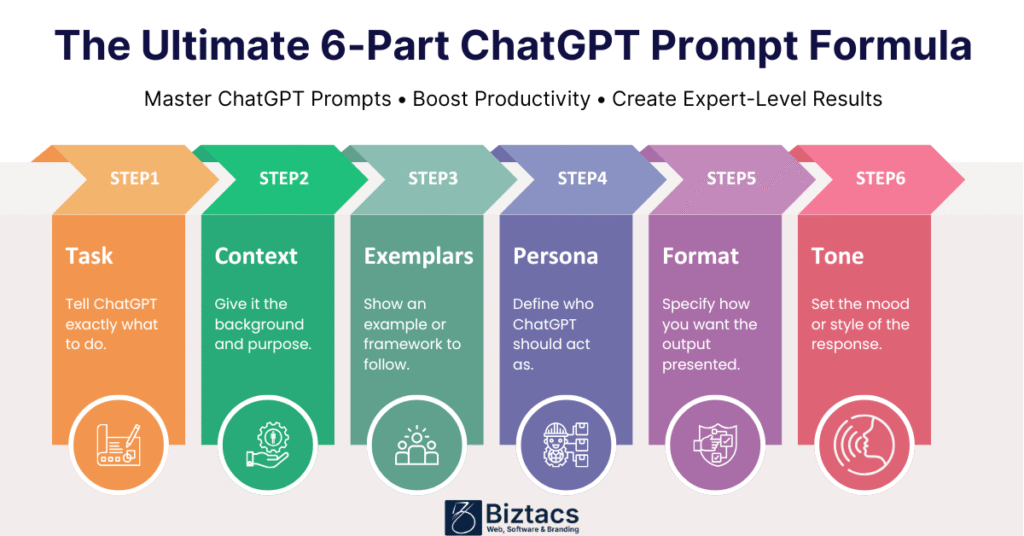
The Core Strategy: Breaking Down the 6-Part Formula
This formula gives ChatGPT the context, structure, and direction it needs to think like an expert. Each piece plays a unique role. Miss one, and the results can feel incomplete or off-target.
Let’s break down the six parts.
1. Task – Tell ChatGPT Exactly What to Do
Your Task is the action you want ChatGPT to perform. Think of it as the verb in your command: write, analyze, summarize, brainstorm, etc.
Example:
“Write a concise, compelling marketing email…”
If you don’t start with a clear task, the AI has to guess what you want. And when it guesses, it often gets it wrong.
2. Context – Give It the Full Picture
Context tells ChatGPT why it’s doing the task and who it’s doing it for. Without context, it’s like asking a chef to cook without knowing who’s coming to dinner.
Example:
“…for a new line of noise-canceling headphones targeting remote workers.”
Add details about the audience, goals, or product. The more relevant info you give, the better your output.
3. Exemplars – Show, Don’t Just Tell
You can’t expect ChatGPT to read your mind. If you want a specific structure or format, give it an example. That’s what Exemplars are for.
Example:
“Use the AIDA (Attention, Interest, Desire, Action) framework.”
When ChatGPT knows what “good” looks like, it mimics that pattern beautifully.
4. Persona – Define Who the AI Should Be
The Persona gives your prompt its voice. It tells ChatGPT which hat to wear—whether that’s a seasoned marketer, a university professor, or a startup founder.
Example:
“Act as a former Apple copywriter.”
This instantly changes the tone, precision, and confidence of the response. Want a bigger upgrade? Add credentials or experience. “Act as a board-certified pediatrician with 20 years of experience” will always outperform “Act as a doctor.”
5. Format – Tell It How to Present the Answer
Formatting isn’t about fluff—it’s about clarity. When you specify the structure of the output, you reduce guesswork and save editing time later.
Example:
“Output the result in three short paragraphs with a bolded subject line.”
ChatGPT can write lists, scripts, code blocks, outlines—you name it. Just say so.
6. Tone – Set the Mood and Personality
Finally, tone controls how your message feels. Should it be friendly? Confident? Formal? Witty? A simple tone instruction makes a big difference in how the text reads.
Example:
“Maintain a friendly yet confident tone.”
Put it all together, and here’s what a full 6-Part ChatGPT Prompt looks like:
“Write a concise, compelling marketing email (Task) for a new line of noise-canceling headphones targeting remote workers (Context). Use the AIDA framework (Exemplar). Act as a former Apple copywriter (Persona). Output the result in three short paragraphs with a bolded subject line (Format). Maintain a friendly yet confident tone (Tone).”
That’s it—the complete blueprint.
Power User Hacks: Advanced Techniques for Pro-Level Results
Once you’ve mastered the 6-part structure, you can take things up a notch with a few smart hacks. These tricks come straight from seasoned ChatGPT users who rely on it daily for writing, strategy, and coding.
3.1 The “Set and Forget” Hack: Custom Instructions
Ever get tired of repeating your background in every prompt? There’s a fix for that.
In ChatGPT’s Custom Instructions, you can permanently tell the AI who you are and how you like your responses. Add your job title, your preferred writing style, or the kind of tone you like best.
Here’s how to set it up:
- Go to Personalization > Custom Instructions.
- Fill in who you are and what you want ChatGPT to consider when replying.
- Save it once—and you’re done.
From that point on, ChatGPT automatically tailors its responses to your preferences.
It’s the simplest productivity upgrade most users overlook.
3.2 The Quality Leap: Using the Persona Hack
The Persona section isn’t just decoration—it’s the key to next-level results.
Compare these two prompts:
- “Explain why children need vaccines.”
- “Act as a board-certified pediatrician with 20 years of experience. Explain why children need vaccines.”
The second one produces a richer, more trustworthy answer. Specificity in your Persona makes ChatGPT’s tone, structure, and reasoning far more realistic.
Whenever possible, include expertise, credentials, and experience in your Persona line.
3.3 The Focus Hack: Breaking Down Complexity
If you’re working on a big project, don’t dump everything into one massive prompt. ChatGPT performs best when it can focus on one step at a time.
Try breaking your project into smaller parts, like this:
- Step 1: “Research the target audience for eco-friendly skincare brands.”
- Step 2: “Write a brand pitch based on that audience.”
- Step 3: “Refine the pitch for a confident, conversational tone.”
You’ll get cleaner, more focused answers, and you can steer the output more precisely along the way.
Workflow Section: ChatGPT for Daily Productivity
Let’s face it—most of us use ChatGPT at work now. Whether you’re drafting emails, planning a project, or summarizing reports, the right workflow can save hours.
Here’s how to make ChatGPT your daily productivity partner.
4.1 The Confidentiality Hack: Using Temporary Chats
If you deal with private data or client information, use Temporary Chats. This feature works like “incognito mode.” Your data isn’t saved, and nothing is used for training.
It’s perfect when you need ChatGPT’s help on something sensitive—like writing an internal memo or reviewing confidential research.
4.2 The Long-Form Editor: Mastering Canvas
Ever wish you could edit a full document while still chatting with ChatGPT? That’s what Canvas does.
Canvas gives you a split-screen view: your chat on one side and the editable document on the other. You can see your prompts, tweak paragraphs, and get feedback in real time.
Writers, coders, and marketers love it because it cuts out constant copy-pasting. You can stay in flow and refine your work as you go.
4.3 The Learning Hack: Upload and Quiz
ChatGPT isn’t just for writing—it’s a personal tutor too. Upload a PDF, lecture notes, or an article, and ask it to:
- Summarize it in plain English.
- Create a quiz to test your understanding.
- Explain it “like I’m five.”
This method, often called ChatGPT Prompt Genius, is one of the best ways to learn fast. You can turn dense research into bite-sized lessons in minutes.
FAQs About ChatGPT Prompts
1. What is a ChatGPT Prompt Cheat Sheet?
It’s a quick reference that outlines the best structures and examples to use when writing prompts. It often includes the 6-Part Formula, tone examples, and persona ideas.
2. How is ChatGPT Prompt Genius different from normal prompting?
ChatGPT Prompt Genius focuses on mastery. It’s about using tested frameworks, specific personas, and structured prompts to get top-tier results instead of generic answers.
3. Can I use this formula for coding or data analysis?
Absolutely. The same logic applies. Just swap out writing tasks for technical ones, like “Generate a Python script” or “Analyze this dataset.”
4. Do I have to use all six parts every time?
No. Think of it like seasoning food. Use the full formula when quality matters most, and pick the essential parts (Task + Context + Persona) for quick requests.
5. What’s the biggest mistake beginners make?
They write prompts that are too short or too vague. The AI can’t fill in blanks it doesn’t know exist. More detail means better results.
Conclusion: Your New Prompting Mindset
Getting powerful results from ChatGPT isn’t about being tech-savvy—it’s about giving clear, complete instructions. The 6-Part ChatGPT Prompt Formula gives you that structure.
To recap:
- Start with a clear Task.
- Provide Context so ChatGPT knows the goal.
- Use Exemplars to guide structure.
- Add a Persona to shape voice and expertise.
- Define the Format to control the output.
- Finish with a Tone that fits your audience.
Once you layer in the hacks—Custom Instructions, expert Personas, and step-by-step workflows—you’ll never see “generic” results again.
Here’s a simple challenge: try updating just one part of your next prompt. Maybe add a Persona or turn on Custom Instructions. You’ll notice the quality leap immediately.
Because once you learn to think in systems, not sentences, ChatGPT stops being a toy—and starts becoming your most reliable creative partners.