
Ubersuggest is an SEO and content marketing platform that helps you find profitable keywords, analyze competitors, and audit your website for technical issues and content gaps. It combines keyword research, traffic analysis, backlink data, and site audits in one dashboard so you can improve rankings and grow organic traffic more efficiently. Below is a structured blog-style guide that walks through each major feature you mentioned, along with suggestions for what type of image to use in every section.
What Is Ubersuggest?
Ubersuggest is a free‑to‑freemium SEO tool created by Neil Patel that focuses on keyword research, traffic analysis, competitive intelligence, and site audits. It pulls data like search volume, keyword difficulty, backlinks, and on‑page SEO issues to help you plan and optimize your content strategy.
For bloggers, marketers, and small businesses, Ubersuggest acts as an all‑in‑one toolkit for discovering topics, tracking performance, and fixing technical SEO problems without needing multiple tools.
Key Features Overview
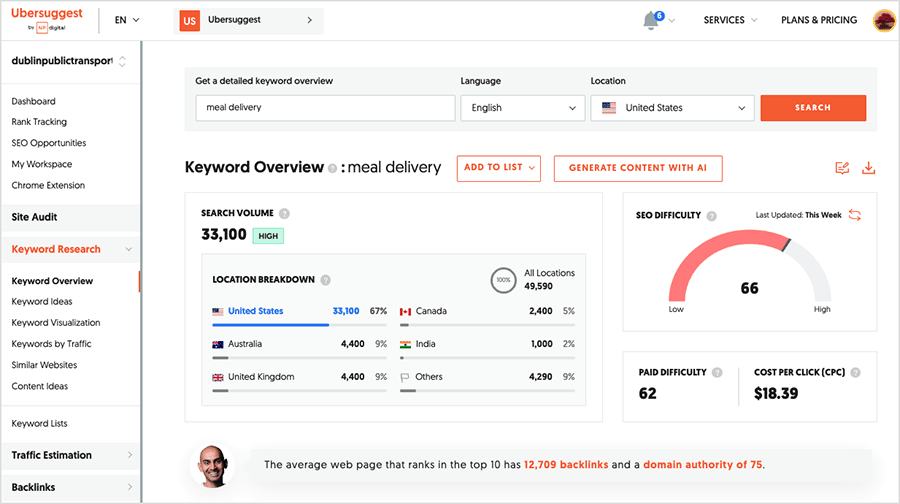
Ubersuggest’s interface is organized into modules: Keyword Research, Traffic Analyzer, SEO Analyzer (Site Audit), and Backlinks. Under each of these, you get granular reports like Keyword Overview, Keyword Ideas, SERP Overview, Top Pages, Site Audit details, and backlink lists.
This modular layout makes it easy to move from research (keywords) to execution (content and site optimization) to tracking (traffic, rankings, and backlinks) in a single workflow.
Keyword Ideas
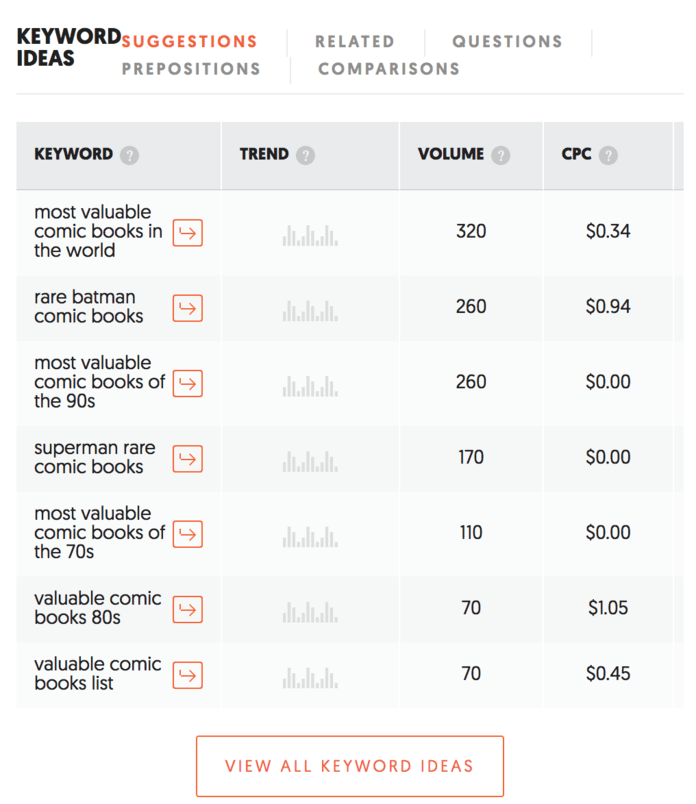
The Keyword Ideas report generates related keyword suggestions based on your seed term, including variations, questions, comparisons, and preposition phrases. It typically shows metrics such as search volume, SEO difficulty, paid difficulty, and cost per click (CPC) so you can prioritize keywords with the best balance of traffic and competition.
You can filter keyword ideas by intent (informational, navigational, commercial, transactional) to align topics with different stages of your marketing funnel.
Keyword Overview
The Keyword Overview report lets you zoom in on a single term and see whether it is worth targeting. It provides an at‑a‑glance view of search volume, difficulty scores, paid metrics, search intent, and the pages currently ranking for that keyword.
This view is especially useful before investing in a big piece of content or a landing page, because it shows how competitive the term is and what level of authority top pages have.
Overview and Search Volume Trend
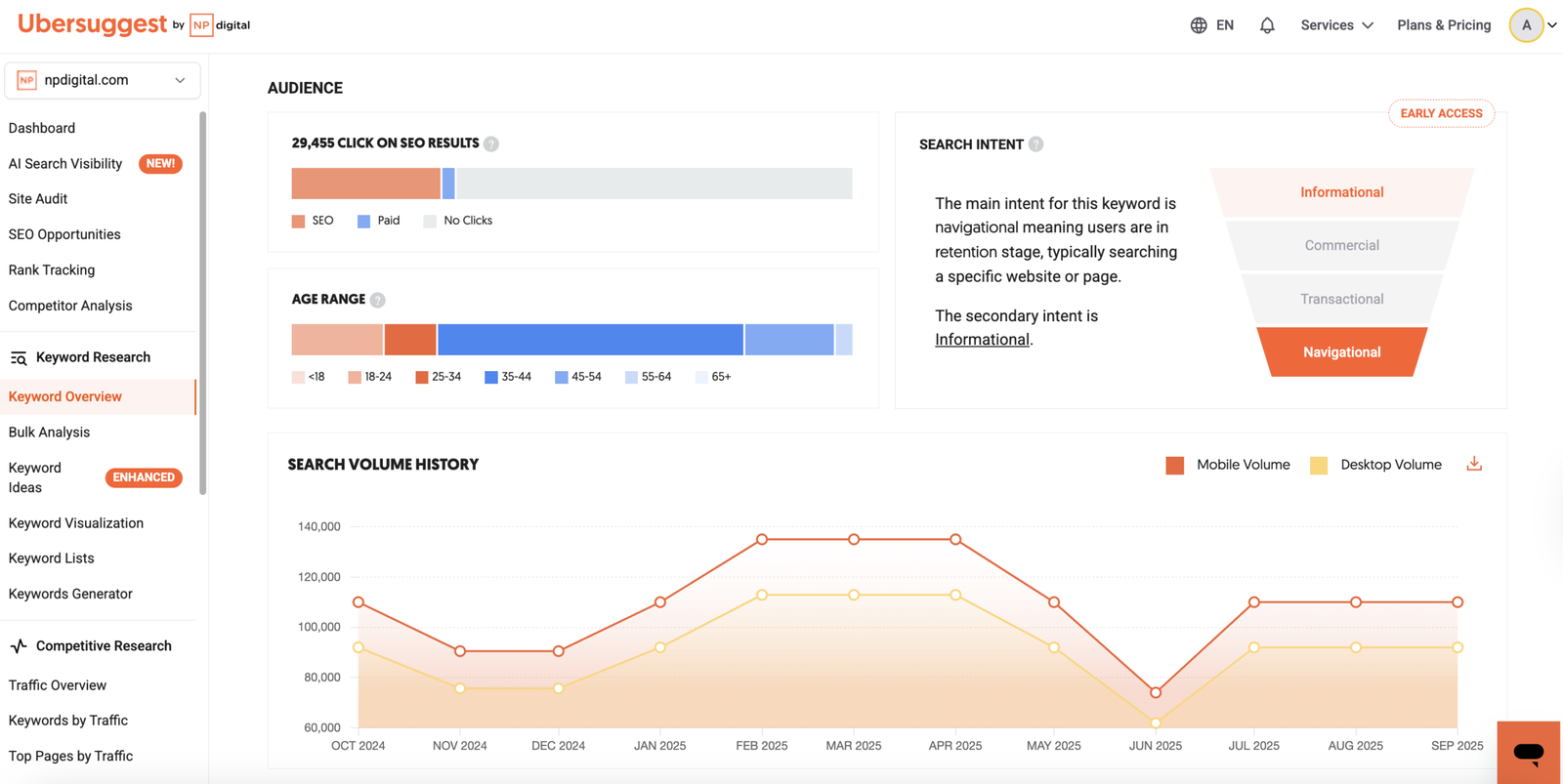
Within Keyword Overview, Ubersuggest displays the monthly search volume and a trend chart, often for the last 12 months or more. This helps you see whether interest in a topic is rising, stable, or declining before you commit time and budget to ranking for it.
Seasonality becomes clearer through these trend graphs, allowing you to plan content in advance of peak demand periods (for example, “Black Friday deals” or “wedding photography”).
Average Backlinks and Domain Score (Keyword)
For each keyword, Ubersuggest estimates how many backlinks the average top‑ranking page has and what kind of domain authority (Domain Score) is typically required. These metrics help you understand link building requirements and whether your site currently has enough authority to compete.
If the average backlink count and Domain Score are much higher than your own, it signals that you may need a long‑term link‑building strategy or to target less competitive variants first.
Content Ideas (Keyword Level)
The Content Ideas report shows popular pages related to your keyword, often including estimated visits, backlinks, and social shares. By studying these pages, you can see what angles, formats, and structures perform best in your niche and then create improved or more in‑depth content.
This feature is powerful for building content calendars because it gives you proven topics instead of guessing what might work.
SERP Overview
The SERP Overview within a keyword report lists the current top‑ranking pages, along with metrics like estimated traffic, backlinks, and Domain Score. It effectively shows you the competitive landscape for that keyword, including which domains dominate the first page.
Analyzing SERP Overview lets you benchmark your site against competitors, evaluate content depth, and identify gaps such as missing formats (video, comparison tables, FAQs, etc.).
Traffic Analyzer Overview
The Traffic Analyzer (often called Traffic Overview) estimates how much organic traffic a domain receives from search engines. It also shows the number of ranking keywords, top pages, and traffic trends over time, which is invaluable for competitor analysis.
You can use this overview to compare your site’s growth against competitors, spot sudden jumps or declines, and identify which content types bring in the most visitors.
Organic Keywords
Inside Traffic Overview, the Organic Keywords metric shows how many search terms a domain ranks for in Google’s organic results. Ubersuggest also lets you drill down to see the actual keyword list, current ranking positions, estimated traffic per keyword, and search volume.
Tracking changes in organic keyword counts over time helps measure the overall health and reach of your SEO efforts.
Organic Monthly Traffic
Organic Monthly Traffic is Ubersuggest’s estimate of how many visits a site receives from unpaid search results each month. This figure aggregates traffic across all ranking keywords and is recalculated as rankings move up or down.
Monitoring this metric for your site and competitors shows whether your strategies are working and where big traffic opportunities might exist.
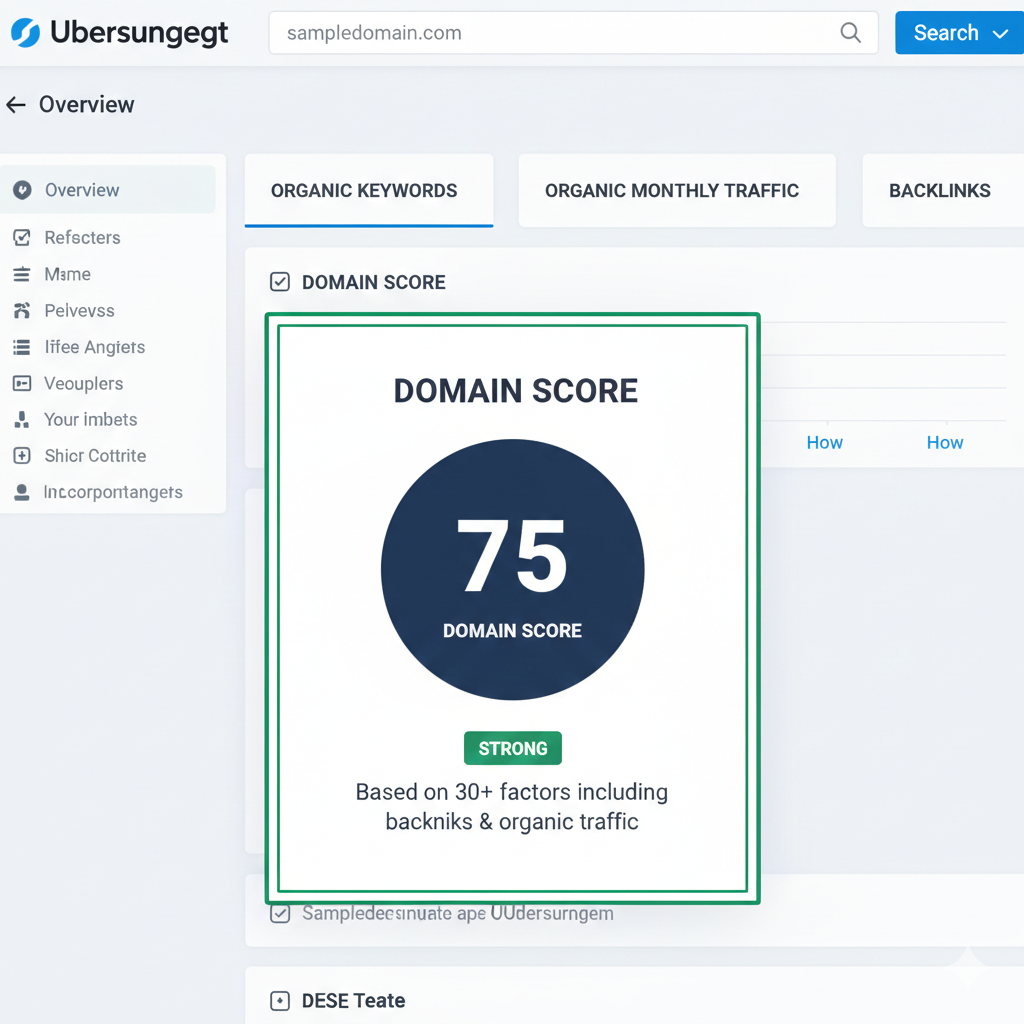
Domain Score (Domain Authority)
Domain Score in Ubersuggest is an authority metric that approximates how strong and trustworthy a domain appears in search engines. It is influenced by factors such as the number and quality of backlinks and the overall size of the website.
Higher Domain Scores generally indicate a greater ability to rank for competitive keywords, while newer sites with lower scores should focus on long‑tail opportunities and consistent content publishing.
Backlinks (Domain Level)
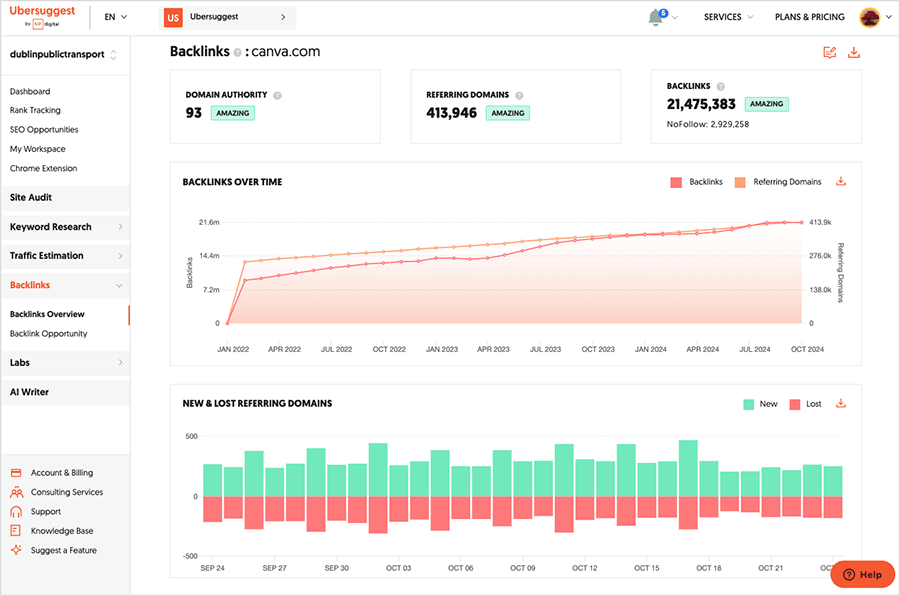
The Backlinks section shows how many links point to your domain, as well as referring domains, link types (follow/nofollow), and new vs. lost links. It helps you understand your link profile’s strength and identify opportunities to earn more high‑quality links.
Evaluating competitor backlink profiles can reveal which websites are open to linking in your niche and what content tends to attract the most links.
Traffic Trend Chart
Ubersuggest visualizes traffic and keyword metrics using trend charts so you can quickly see growth or decline. Common charts include organic traffic over time, keyword count over time, and keyword search volume trends for specific terms.
These charts are useful for reporting and for aligning SEO performance with other marketing activities, such as campaigns or website redesigns.
Top Pages
The Top Pages report lists the URLs on a site that generate the most search traffic, along with their estimated visits, ranking keywords, and backlinks. This makes it easy to identify your star performers and prioritize updating or internally linking from those pages.
When analyzing competitors, Top Pages helps you reverse‑engineer their content strategy and discover keyword themes that bring them the most traffic.
Keywords (Per Page)
From the Top Pages or page‑level view, Ubersuggest shows which keywords each URL ranks for and in what positions. This helps you optimize pages further by adding related terms, improving on‑page SEO, or creating spin‑off content targeting secondary keywords.
Identifying pages that rank on page 2 or 3 for high‑value terms gives you quick‑win opportunities through better optimization and internal linking.
Site Audit Overview
The Site Audit (SEO Analyzer) scans your website for technical and on‑page SEO issues, assigning an overall health score. It analyzes factors like metadata, internal links, indexation, sitemap and robots issues, and more.
This report is crucial for ensuring your technical foundation is solid so your content can rank as intended.
On‑Page SEO Score
Within the Site Audit, Ubersuggest provides an On‑Page SEO Score that indicates how well‑optimized your pages are according to current best practices. This score considers elements such as title tags, meta descriptions, headers, keyword usage, and internal linking.
Improving this score often results in better visibility without necessarily creating new content, simply by polishing existing pages.
Pages Discovered
The Pages Discovered metric shows how many URLs Ubersuggest found during the audit crawl. A significant discrepancy between discovered pages and what you expect may indicate crawl barriers, missing sitemaps, or duplicate content issues.
Knowing exactly how many pages search engines can access is foundational to scalable SEO, especially on large sites.
Critical Errors, Warnings, and Recommendations
Ubersuggest categorizes issues into Critical Errors, Warnings, and Recommendations. Critical Errors are high‑priority problems that can significantly harm rankings, while Warnings and Recommendations highlight less severe but still important optimizations.
Examples include broken links, missing title tags, slow pages, or thin content; resolving them improves both user experience and SEO performance.
Site Speed
The Site Audit also includes page speed insights or site speed indicators that show how quickly your pages load. Slow loading times can negatively impact user experience and search rankings, making this metric important to monitor.
Often, Ubersuggest will point out heavy images, render‑blocking scripts, or other elements that may be slowing your site down.
Top SEO Issues
The Top SEO Issues section shortlists the most impactful problems discovered during the audit so you know where to start. These typically include missing meta tags, duplicate content, slow pages, or issues with mobile friendliness.
Addressing these issues in order of severity and impact can lead to noticeable ranking improvements in a relatively short time.
Backlink Dashboard and Backlink List
The Backlink dashboard gives a high‑level view of your domain’s link profile, including total backlinks, referring domains, and new vs. lost links. From here, you can access detailed backlink lists showing source URL, anchor text, type of link, and target page.
This granular backlink list helps you identify strong links to protect, low‑quality links to monitor, and websites that may be open to outreach and collaboration.
By using Ubersuggest’s keyword, traffic, site audit, and backlink features together, you can build a comprehensive SEO workflow—from discovery and planning to optimization and performance tracking. Pairing each section of your blog with screenshots or illustrative graphics will make the content more actionable and visually engaging for readers.